

Version 3.5.0.dynamics downloads
Please inform us of any bugs, issues or feature requests via our online forum.
Mac OSX
Chrome users: If the DMG opens as text, right-click the button and choose Save Link As.
Instructions for DMG app installation:
Download the .dmg file and open it by double-clicking it in the Finder.
A disk image window will appear.
Drag CcpNmrAnalysis.app to the location where you want to install it, normally the Applications folder. Avoid installing it in a directory path containing blank spaces if you intend to run the command-line scripts directly.
To start the program normally, double-click CcpNmrAnalysis.app.
A brand-new CcpNmr Analysis Launcher will open alongside AnalysisDynamics. More information and documentation about the Launcher will be available soon.
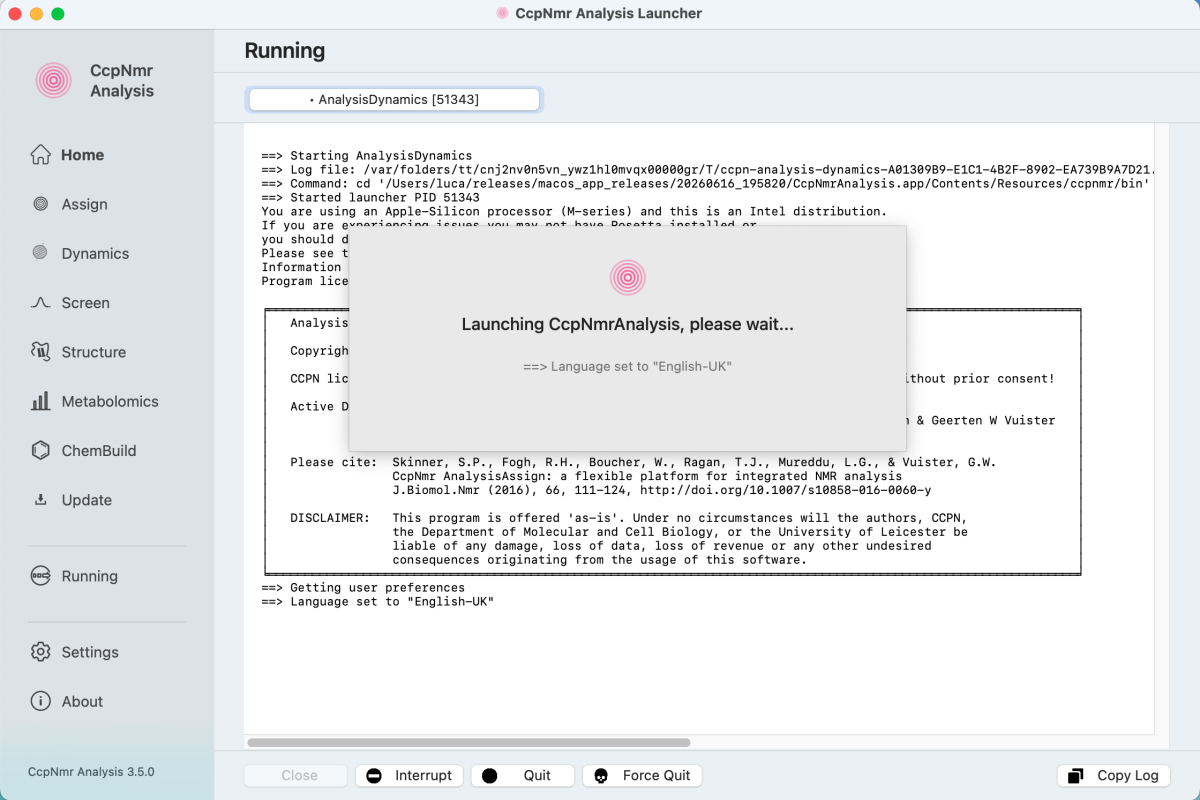
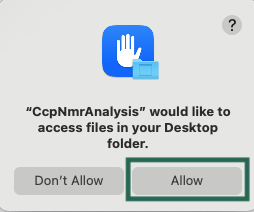
Because the Launcher is a native macOS app, macOS may ask for permission to access files in your folders when opening or saving projects. Simply click “Allow”.
You can also start the individual programs from an ordinary Mac terminal window. For example, if you copied CcpNmrAnalysis.app to your Downloads folder, change directory to:
Bashcd ~/Downloads/CcpNmrAnalysis.app/Contents/Resources/ccpnmr/bin/
Then start the required program with one of the commands below:
Bash./analysisdynamics
same for the other available programs: analysisassign, analysisscreen, analysisstructure, analysismetabolomics etc
Mac OS 10.11 (El Capitan) and older
Unfortunately, the libraries we use from Version 3.1 onwards are not compatible with Mac OS 10.11 and older. You will either need to update your operating system or use an older version of CcpNmr Analysis.
iCloud
Unfortunately, the program does’t currently work properly in conjunction with iCloud. We do hope to enable this in future, though.
Remote Working
We strongly recommend that you save your project on a local disk (local to where the program is installed and running). This is because Analysis regularly writes to your project files and is currently not set up to deal with temporary breaks in the connection. If you are writing to a remote disk, you could easily end up with your project in a compromised state which will make it unreadable later. However, if your spectrum files (which are generally what take up a lot of disk space) are on a remote disk/server, then that is fine. Analysis only has to read these files and so there shouldn’t be any issues.
This obviously does not stop you from logging into a machine using software such as VNC or TeamViewer to run the program remotely. In that case only the graphics are being relayed and the program installation and project can still be on the same disk.
32-bit systems
Please note that our executables will only work on 64-bit computers.
Linux
Instructions for command-line installation:
Uncompress the .zip file where you want it on your disk (no blank spaces in the directory path!), either in a file browser, or on the command with unzip release3.5.0Rocky9.8-Dynamics.zip.
To run the program, open a terminal window and type bin/dynamics (or bin/analysisdynamics) in the ccpnmr3.5.0 directory. You can add the ccpnmr3.5.0/bin/ directory to your PATH, in which case you will then be able to run it just by typing dynamics (or analysisdynamics). Alternatively, create an alias in your .bash or .cshrc.
The above distributions may also work for some other flavours of Linux (please let us know if they do!). If they do not work for a particular Linux variant, please contact us to see if we can work with you to get a distribution ready.
In the unusual event that you get the following error message (or very similar) on CentOS7:
error while loading shared libraries: libXss.so.1
then please run the following command from a terminal window:
yum install libXScrnSaver
to install the missing dependencies.
Remote Working
We strongly recommend that you save your project on a local disk (local to where the program is installed and running). This is because Analysis regularly writes to your project files and is currently not set up to deal with temporary breaks in the connection. If you are writing to a remote disk, you could easily end up with your project in a compromised state which will make it unreadable later. However, if your spectrum files (which are generally what take up a lot of disk space) are on a remote disk/server, then that is fine. Analysis only has to read these files and so there shouldn’t be any issues.
This obviously does not stop you from logging into a machine using software such as VNC or TeamViewer to run the program remotely. In that case only the graphics are being relayed and the program installation and project can still be on the same disk.
32-bit systems
Please note that our executables will only work on 64-bit computers.
Windows
Instructions for installation and start-up:
Unzip the file (this may be quite a slow process, particularly if you have Avast or similar anti-virus software installed). Then go to the ccpnmr3.5.0/bat directory and double-click on update.bat to install any recent patches and other updates. Once the updates are complete, double-click on dynamics.bat to start the program. The first time you start the program it may take a while till the main window opens, as all the fonts need to be built.
We recommend running the program on a 64-bit computer with minimum i5 processor. The program may be slow to start up, but should then run okay. You can improve the performance by installing the program on a solid state drive (SSD).
Windows 11
Our Windows 11 build is new and has not been extensively tested. Please let us know at support@ccpn.ac.uk if you experience any problems with it.
Remote Working
We strongly recommend that you save your project on a local disk (local to where the program is installed and running). This is because Analysis regularly writes to your project files and is currently not set up to deal with temporary breaks in the connection. If you are writing to a remote disk, you could easily end up with your project in a compromised state which will make it unreadable later. However, if your spectrum files (which are generally what take up a lot of disk space) are on a remote disk/server, then that is fine. Analysis only has to read these files and so there shouldn’t be any issues.
This obviously does not stop you from logging into a machine using software such as VNC or TeamViewer to run the program remotely. In that case only the graphics are being relayed and the program installation and project can still be on the same disk.
32-bit systems
Please note that our executables will only work on 64-bit computers.
